 Skip to content
Automated email flows are the backbone of profitable eCommerce email marketing. Unlike one-off campaigns, flows run continuously in the background, triggered by customer behavior, converting visitors into buyers and buyers into repeat customers around the clock.
5
Core Email Flow Types
50–60%
Welcome Series Open Rate
45%
Abandoned Cart Recovery Potential
3–5x
ROI of Automated vs Manual Emails
Yet most eCommerce stores set up their flows once and never touch them again. This is a massive missed opportunity. At MDigital, we have seen flow optimization alone increase total email revenue by 30% to 80% for our clients. The potential is enormous.
This guide walks you through optimizing each essential eCommerce email flow for maximum conversions, with specific tactics and examples you can implement immediately.
The Essential eCommerce Email Flows
Before diving into optimization, let us establish which flows every eCommerce store needs. These are listed in order of typical revenue impact.
What We Built: Automated Email System for a Cycling Retailer
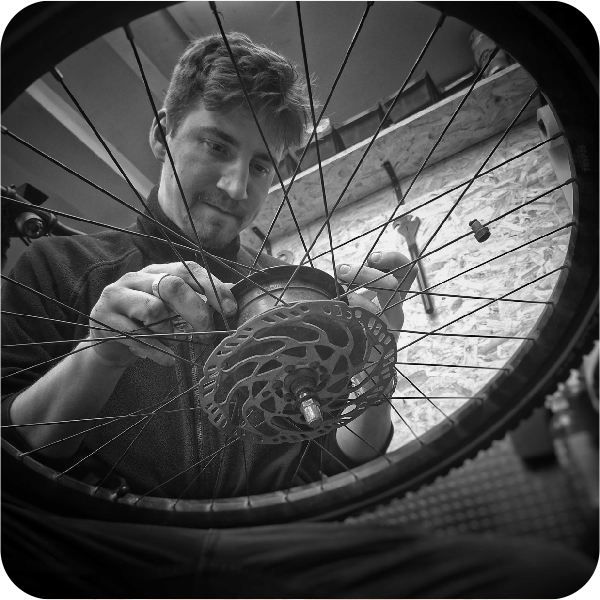
We built a full Omnisend automation ecosystem for this bicycle service company — custom API integrations, 7+ automated flows, generating €131K in email revenue. Each flow below includes live data from this build.
- Abandoned cart flow (highest revenue per email)
- Welcome series (highest engagement rates)
- Browse abandonment flow (high volume, moderate conversion)
- Post-purchase flow (drives repeat purchases)
- Win-back flow (re-engages lapsed customers)
- Replenishment flow (for consumable products)
- VIP and loyalty flow (rewards best customers)
If you are missing any of these, that is your first priority. You cannot optimize what does not exist. Now let us look at how to optimize each one.
Optimizing Your Abandoned Cart Flow
Your abandoned cart flow is almost certainly your highest-revenue automated sequence. Here is how to maximize its performance.
Optimal Timing Sequence
The timing of your abandoned cart emails significantly affects recovery rates. Based on extensive testing across our client base, here is the sequence that consistently performs best:
- Email 1: 1 hour after abandonment. This is a gentle reminder. Keep it simple: show the abandoned products, make it easy to return to cart. No discount needed yet. Subject line example: “You left something behind.”
- Email 2: 24 hours after abandonment. Add social proof and address common objections. Include reviews, ratings, or testimonials for the abandoned products. Subject line example: “Still thinking it over? Here is what others say.”
- Email 3: 72 hours after abandonment. This is your last chance. Consider adding a small incentive like free shipping or a modest discount (5% to 10%). Create urgency without being manipulative. Subject line example: “Your cart expires soon” or “Last chance: free shipping on your order.”
Key Elements That Improve Cart Recovery
- Product images: Always include clear images of the abandoned products. Visual reminders are more effective than text descriptions.
- Dynamic cart contents: Show exactly what the customer left behind, including sizes, colors, and quantities.
- One-click return: The link should take them directly back to their populated cart, not to the homepage or product page.
- Mobile optimization: Over 60% of cart abandonment happens on mobile. Your recovery emails must be mobile-first.
- Customer support access: Include a way to contact support. Some carts are abandoned because of questions, not disinterest.
Discounting Strategy
Many stores make the mistake of offering discounts in their first abandoned cart email. This trains customers to abandon their carts intentionally to receive a discount. Instead, reserve discounts for the final email in your sequence, and consider using them only for first-time buyers. Monitor your abandonment rate after implementing discounts. If it increases, your discount strategy may be backfiring.
Optimizing Your Welcome Series
Your welcome series is the first impression your email program makes. Subscribers are most engaged right after signing up, so this is your best opportunity to establish the relationship and drive first purchases.
Recommended Welcome Series Structure
- Email 1 (Immediate): Deliver the promise. If you offered a discount for signup, deliver it immediately. Include a clear CTA to shop. Keep this email focused and brief. Conversion rate benchmark: 3% to 8%.
- Email 2 (Day 2): Tell your brand story. Share what makes your brand different. Include your founding story, mission, or values. This builds emotional connection and trust. Include social proof: customer counts, reviews, or press mentions.
- Email 3 (Day 4): Showcase bestsellers. Feature your top-selling products with social proof. Use “most popular” or “customer favorites” framing. This helps new subscribers discover your best offerings quickly.
- Email 4 (Day 7): Address objections. Cover common concerns: shipping speed, return policy, product quality, customer support. Include a FAQ section or link to helpful resources. This email removes barriers for hesitant first-time buyers.
- Email 5 (Day 10): Final conversion push. If the subscriber has not purchased, send a last reminder with their welcome offer before it expires. Create genuine urgency with a real deadline.
Welcome Series Optimization Tips
Segment by signup source. Someone who signed up through a blog post has different intent than someone who signed up for a discount pop-up. Tailor the series accordingly. Test your incentive. Some audiences respond better to percentage discounts, others to dollar amounts, and some to free shipping. Track the full funnel: signup rate, first email open, click, and ultimately purchase conversion.
Optimizing Browse Abandonment Flows
Browse abandonment targets users who viewed products but did not add anything to their cart. These users have shown interest but need an additional push.
Browse Abandonment: 68% Open, 30.6% CTR

Non-subscriber browse abandonment flow. First email fires 5 minutes after the visitor leaves. 733 recipients, €2,358 in attributed revenue — well above industry benchmarks.
Timing and Frequency
- Email 1: 2 to 4 hours after browsing. Show the products they viewed. Keep the tone helpful rather than salesy: “We noticed you were looking at these” not “Buy now before it is too late.”
- Email 2: 24 to 48 hours later. Show related products or alternatives. If they viewed a specific category, show bestsellers from that category. Include reviews or ratings to build confidence.
Important Considerations
Be careful with browse abandonment frequency. Sending these emails too often feels invasive. Set frequency caps: no more than one browse abandonment email per week per subscriber. Exclude subscribers who have recently received abandoned cart emails. Focus on high-intent browsing: multiple product views or significant time on product pages are stronger triggers than a single quick page view.
Optimizing Post-Purchase Flows
The post-purchase flow is your most underutilized revenue opportunity. Most stores send an order confirmation and nothing else. Top performers use this window to build loyalty and drive repeat purchases.
Post-Purchase Review Request: 42.4% Open Rate

Triggered after the customer’s second order. 4,170 sends, 5.1% CTR, €1,021 in revenue. Timing the ask after repeat purchase increases response rates.
Cross-Sell Upsell: 61.9% Open, €1,202 Revenue

Accessory discount flow for bike buyers. Fires 1 hour after purchase. 84 recipients, 14.2% CTR. Small audience, high intent.
Post-Purchase Sequence Structure
- Email 1 (Immediately): Order confirmation. Confirm the order details. Set expectations for shipping and delivery. Include a clear timeline. This is primarily transactional but sets the tone.
- Email 2 (Day 3-5): Shipping and anticipation building. Notify when the order ships. Share tips for using the product. Build anticipation and reduce buyer’s remorse.
- Email 3 (Day 10-14): Check-in and review request. Ask how they are enjoying their purchase. Request a review. Make the review process simple, ideally one click to start.
- Email 4 (Day 21-30): Cross-sell. Recommend complementary products based on what they purchased. Use “customers who bought X also bought Y” framing. This is where repeat revenue happens.
- Email 5 (Day 45-60): Repurchase or re-engage. For consumable products, time this with typical replenishment cycles. For durable goods, suggest related categories or accessories.
Segmenting Post-Purchase by Customer Type
First-time buyers need different post-purchase communication than repeat customers. For first-time buyers, focus on building trust, confirming they made a good choice, and reducing buyer’s remorse. For repeat customers, focus on rewards, loyalty program enrollment, and exclusive offers that make them feel valued.
Optimizing Win-Back Flows
Win-back flows target customers who have not purchased in a defined period. The typical trigger is 60 to 90 days of inactivity, but this should be customized based on your product’s typical repurchase cycle.
Win-Back: €307.6K From 6,197 Dormant Contacts

6-month inactivity reactivation. 52.1% open rate, 6.4% CTR. The highest total revenue of any flow in this account — proof that reactivation is underrated.
Win-Back Sequence Structure
- Email 1: “We miss you” message. Remind them of your brand. Highlight what is new since their last purchase. Keep the tone warm and personal, not desperate.
- Email 2 (5-7 days later): Showcase new products or improvements. Show them what has changed since they last shopped. New arrivals, improved products, or enhanced services all work well.
- Email 3 (10-14 days later): Incentive offer. Offer a meaningful discount or special deal. Make it exclusive to lapsed customers. Set a clear expiration date.
- Email 4 (21-28 days later): Final attempt and list hygiene. “Is this goodbye?” Last chance to re-engage. If they do not respond, move them to a suppression list to protect your sender reputation.
Advanced Flow Optimization Techniques
Once your basic flows are running, these advanced techniques can further improve performance.
Dynamic Content and Personalization
Use customer data to personalize flow emails beyond just first name insertion. Product recommendations based on browsing and purchase history, location-specific content such as store locations and local shipping options, gender-specific product suggestions, and price-range-appropriate recommendations all drive higher engagement and conversions.
SMS Integration
Adding SMS to your email flows can significantly boost recovery rates. Particularly effective use cases include abandoned cart SMS reminders (15% to 20% higher recovery when combined with email), shipping notifications via SMS, and flash sale alerts for VIP segments. Platforms like Omnisend make it easy to combine email and SMS within the same automation flow. As an Omnisend partner, we at MDigital have seen stores increase their flow revenue by 20% to 35% simply by adding SMS touchpoints to existing email flows.
Conditional Splits
The best flows adapt based on subscriber behavior within the flow itself. Examples include different follow-up content for openers vs non-openers, different messaging for clickers who did not convert, skipping discount emails for subscribers who already made a purchase, and adjusting timing based on engagement patterns.
A/B Testing Within Flows
Continuously test elements within your flows. Start with subject lines since they have the biggest impact on open rates, then test email content and design, CTA placement and copy, sending times, and offer amounts and types. Run each test for at least 1,000 recipients before drawing conclusions. Our guide on A/B testing for small eCommerce stores provides more guidance on testing with limited data.
Measuring Flow Performance
Track these metrics for each flow to understand performance and identify optimization opportunities.
The Full Picture: 56% of Store Revenue From Automation
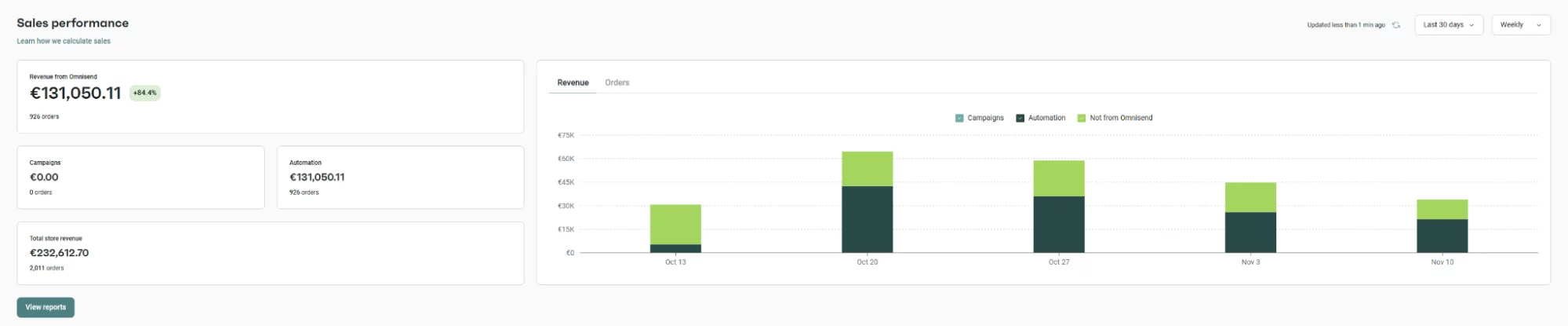
Omnisend dashboard showing €131,050 in automation revenue out of €232,612 total. Zero campaign sends — 100% of email revenue came from automated flows we built.
Revenue Metrics
- Revenue per flow per month: Total revenue attributed to each flow.
- Revenue per email: Revenue divided by emails sent in the flow.
- Contribution to total email revenue: What percentage of total email revenue comes from each flow.
Engagement Metrics
- Click-through rate by email position: How engagement changes through the flow sequence.
- Conversion rate by email position: Which email in the sequence drives the most conversions.
- Unsubscribe rate by flow: Identify flows that are pushing too hard.
For context on how your flow metrics compare to industry standards, see our comprehensive email marketing conversion rate benchmarks for 2026.
Real-World Results: MDigital × 360cycles (Omnisend Case Study)
MDigital built a custom API integration connecting Lightspeed POS to Omnisend for a European cycling retailer, automating 5 key flows: pickup notifications, service reminders, accessory upsells, reactivation campaigns, and post-purchase sequences. Results: ~70% open rates, €1,202 revenue from upsell flows in 14 days, €1,021 from service flows in 7 days, and 422 reactivated contacts. All 26 daily manual bike pickup updates were fully automated.
Welcome
Series to onboard new subscribers
Cart Recovery
3-email abandoned cart sequence
Post-Purchase
Thank you, review, cross-sell
Browse Abandon
Re-engage product viewers
Win-Back
Reactivate lapsed customers
Common Flow Optimization Mistakes
Avoid these errors that we see frequently in eCommerce email programs.
- Set-and-forget mentality: Flows need regular review and optimization. Schedule quarterly flow audits.
- Too many emails too fast: Overwhelming subscribers with too many flow emails in a short period leads to unsubscribes and spam complaints. Set frequency caps across all flows.
- Generic content: Using the same generic messaging for all subscribers wastes the personalization potential of automated flows.
- Ignoring flow conflicts: Make sure subscribers are not receiving conflicting messages from multiple flows simultaneously. Prioritize flows and set exclusion rules.
- No mobile testing: Always preview and test your flow emails on mobile devices before launching.
Your email flows do not exist in isolation. They drive traffic to your store, and what happens on your store determines whether that traffic converts. Aligning your email optimization with your overall conversion rate optimization strategy multiplies the impact of both efforts.
Let Us Build and Optimize Your Email Flows
As an Omnisend partner, MDigital builds high-converting email and SMS automation flows for eCommerce businesses. From initial setup to ongoing optimization, we handle the strategy, copywriting, design, and performance analysis to maximize your email marketing revenue.

